MyChart
- 4.4
- Rating
- 10.00M
- Installs
- Free
- Price

 Analysis by App-foxy
MyChart is the kind of medical app I appreciate most when I need to turn a vague healthcare task into a clear next step. Developed by Epic Systems Corporation, it brings patient-facing access to medical information onto an Android device instead of leaving everything scattered across phone calls, paper instructions, and separate office visits. I found its strongest value in the way it can make an ongoing care relationship easier to follow, especially when several appointments, test results, prescriptions, or questions are involved.
This is a free medical app for everyone, and its broad reach is reflected in an average rating of 4.5 from around 254 thousand ratings, with over 10 million installs. Those figures do not make it perfect, but they do suggest that it has become a familiar tool for many patients. My experience is that its usefulness depends less on the app alone and more on whether the healthcare organization and clinicians connected to my care use the Epic system effectively.
Why the connected medical record matters
The central capability I focused on is access to a connected patient record. Rather than treating a phone as a simple appointment reminder, MyChart can act as a place where parts of a healthcare relationship are brought together. That changes the practical question from “Where did I put that instruction?” to “Can I find the relevant information in the same place where I am already checking my care?”
You May Also Like

 Pandora - Music & Podcasts
Pandora’s Music Is Easy to Start, but Harder to Recover
Pandora’s strength is its low-effort path from a seed to a station. Its weak spot is how much confidence it asks you to place in connection, setup, and quiet recovery.

 AccuWeather: Weather Radar
AccuWeather Review: A Quick, Clear Forecast for Everyday Decisions
For everyday plans, the best forecast is the one you can understand quickly. AccuWeather makes rain timing, radar, and local conditions easy to act on, with a few trade-offs.

 Hill Climb Racing
Why Hill Climb Racing Still Turns Crashes Into One More Run
A tiny car, a bumpy hill and one more upgrade: Hill Climb Racing keeps resurfacing because its simple chaos makes every near-miss feel personal.

 AliExpress - Shopping App
AliExpress Makes Global Shopping Feel Personal, but Shoppers Bear the Risk
AliExpress turns a global marketplace into a pocket-sized discovery engine. Its reach is useful, its shopping loop compelling, and its trade-offs easy to miss.

 Lords Mobile: Kingdom Wars
Lords Mobile Is a Kingdom-Building Routine, Not a Quick Match
A case-by-case verdict on the building, battles, device demands, and social commitments that make Lords Mobile rewarding for some players and exhausting for others.

 PDF Scanner app - TapScanner
TapScanner Makes Paperwork Easier to Capture, Check, and Share
TapScanner makes scanning with a phone feel less like a rescue operation and more like a dependable step in getting work done. Its capture tools are useful, though not flawless.
More From Our News Desk
View All News


That distinction matters after a visit. A short consultation can produce several details that are easy to forget: what the clinician recommended, whether a follow-up is needed, which result is still pending, or what question should be asked next time. Having those details available through the app can reduce the mental work involved in keeping track of care. I do not see it as a replacement for a clinician, but I do see it as a useful bridge between appointments.
The experience is especially helpful for people who manage recurring care rather than a single isolated issue. Someone attending regular appointments may need to check information at different moments, not just immediately after a consultation. The app’s value grows when it becomes part of that routine: review the relevant record before an appointment, check new information afterward, and use the available communication path when a non-urgent question remains.
There is an important qualification. MyChart is not one identical experience for every user. The available information and actions depend on the healthcare organization using it and on how that organization has configured patient access. I would therefore judge it as a doorway into a provider’s digital system, not as an independent medical service with the same capabilities everywhere.
What I found useful during ordinary care
In everyday use, the benefit is not limited to opening the app and reading a record. The more useful habit is to use it as a preparation tool. Before an appointment, I can review earlier information and make a short list of questions instead of relying on memory. Afterward, I can return to the record when I am calmer and less distracted than I was in the examination room.
This workflow is valuable for appointments involving several topics. For example, if I am discussing a continuing symptom while also reviewing another health concern, I may not remember every detail of the conversation. A patient portal gives me a better chance of checking what was documented and separating confirmed information from what I merely assumed I heard.
I also think the app can help reduce unnecessary calls for straightforward administrative questions. That does not mean every issue belongs in a message or digital record. It means that when the provider offers the appropriate option, I can try the available online route before spending time waiting on a phone line. The convenience is modest for a single interaction, but it becomes noticeable when care involves repeated contact.
One practical tip is to open the app with a specific purpose rather than browsing casually. I get more from it when I decide whether I am checking an appointment, reviewing a result, preparing a question, or looking back at previous information. That small change makes the portal feel less like a large archive and more like a working checklist for care.
How the record changes the appointment routine
The most realistic scenario is a follow-up appointment after a test or treatment change. Before the visit, I would use MyChart to gather the details that are already available and write down what still feels unclear. During the appointment, I can concentrate on the conversation instead of trying to reconstruct every earlier event. Later, I can revisit the information and confirm what I need to remember.
This is particularly useful when another person helps with care. A family member may need to help organize questions, remember instructions, or keep track of appointments. The app does not remove the need for clear permission and appropriate communication, but a centralized digital record can make coordination less dependent on handwritten notes or messages passed between people.
Another strong use case is moving between routine and unexpected care. If I have information from earlier interactions available in the same patient-facing environment, I may be better prepared to explain my history. That does not guarantee that every clinician will see every detail, and it should not encourage me to assume that a new provider has reviewed the record. Still, having my own accessible reference is better than depending entirely on memory.
I would also use the app after a visit when emotions have settled. Medical conversations can be stressful, and people often remember the general conclusion while forgetting the exact instructions. Reviewing the available record later can reveal what needs clarification. The important judgment here is knowing when to ask the care team and when to seek urgent help elsewhere. A portal is convenient, but it is not the right channel for an emergency.
The small habits that make it more effective
One non-obvious advantage of a patient portal is that it can improve the quality of the next conversation, not merely store the last one. If I notice a missing detail or an unclear phrase while reviewing my information, I can turn that observation into a precise question. “What should I do?” is less useful than asking about a particular instruction, result, or follow-up step.
I would also avoid treating every newly visible result as self-explanatory. A number or clinical phrase can look alarming without context, or reassuring when it should be discussed alongside symptoms and history. MyChart can help me locate information, but interpretation still belongs in the appropriate clinical conversation. The app is strongest when it supports questions rather than when it encourages self-diagnosis.
A second useful habit is checking the record before contacting the office. Sometimes the answer to a scheduling or follow-up question is already present. If it is not, I can make the eventual call or message more focused because I have already checked the information available to me. This is a small efficiency gain, but it reduces duplicated explanations.
Finally, I would keep expectations realistic about timing. Digital access does not mean that every update appears immediately or that every message receives an instant response. If an issue is urgent, I would use the provider’s recommended urgent-care route rather than waiting for an app interaction. That boundary is essential to using a medical portal responsibly.
Where the experience can be frustrating
The biggest trade-off is that the app’s usefulness is tied to the participating healthcare organization. If my clinic uses the system only for limited tasks, the portal may feel incomplete even though the application itself is well designed. I might prefer one unified record, but the reality of healthcare can involve different providers, systems, and access arrangements.
That also means I would not choose MyChart expecting it to replace every alternative. A clinic’s telephone team may be better for a complicated scheduling issue. A direct conversation may be better for a sensitive question that needs immediate clarification. A paper document may still be useful when another provider does not work within the same digital environment. The app is a strong supplement, not a universal answer.
There can also be friction when information needs interpretation. Reading a result without the surrounding discussion may create more questions than it answers. I consider that a limitation of the portal format rather than a reason to ignore it. The app can present the information efficiently, but efficient presentation is not the same as medical explanation.
Another trade-off is attention. Because the record may contain many kinds of information, I need to avoid opening it without knowing what I am looking for. A focused workflow helps, while aimless checking can increase anxiety, especially for people who are already worried about every change. If reviewing the portal makes me repeatedly interpret ordinary medical updates as emergencies, I would step back and discuss that concern with a professional.
Access and security are also part of the practical experience. A medical record deserves more care than an ordinary shopping or entertainment account. I would use a secure device, avoid casually sharing access, and be careful when reviewing private information in public. These are not reasons to avoid the app; they are part of treating a digital health record with appropriate seriousness.
How it compares with common alternatives
Compared with calling a clinic for every question, MyChart can be more convenient when the information is already documented or when the provider offers a suitable digital contact option. It gives me a chance to prepare before speaking with someone and can reduce the need to repeat basic details. The phone remains better when the matter is complicated, time-sensitive, or not suited to written communication.
Compared with keeping personal notes, the portal may provide information tied more closely to the healthcare organization’s record. Personal notes are still valuable because they capture symptoms, concerns, and day-to-day changes that may not appear in a formal record. I would use both: my own notes for lived experience and MyChart for the information made available through the care system.
Compared with a general health-tracking app, MyChart serves a different purpose. A tracker may be better for habits, measurements, or personal observations, while this app is more relevant to the relationship with a participating medical provider. I would not install it expecting the same kind of coaching or lifestyle dashboard found in a dedicated wellness product.
Compared with a paper folder, the digital record is easier to check when I have my phone available and may be more practical for preparing across several appointments. Paper can still win when I need to hand information to an organization that is not connected to the same system or when a physical copy is specifically requested. The best choice depends on the task, not on a belief that digital is always superior.
Who will gain the most from it
I think MyChart is a particularly good fit for people with ongoing care, multiple appointments, or a regular need to review medical information. It can also help someone who tends to forget questions during visits and wants a better way to prepare afterward. Caregivers may find the organized access useful when they are helping another person coordinate routine healthcare, provided the access arrangement is appropriate.
It is less compelling for someone whose provider does not use Epic’s patient-facing system in a meaningful way. It may also be the wrong primary tool for a person seeking emergency guidance, instant diagnosis, or broad health coaching. Those needs call for a different channel or a qualified professional, not simply a more frequently opened portal.
The app is available at no charge and carries an Everyone age rating, which makes it approachable for a wide range of users. Its current version is 11.6.3 and it requires Android 11 or newer, so compatibility is a practical point to check before planning to use it on an older phone. The release history reaches back to October 31, 2011, showing that this is an established product rather than a newly introduced experiment.
My final view is favorable, but specific: I recommend MyChart when the healthcare organization behind my care supports it well and when I want a dependable way to stay oriented between appointments. Its best feature is not novelty; it is the reduction of friction around an ongoing medical record. I would use it to prepare questions, review available information, and keep follow-up tasks visible, while continuing to rely on clinicians for interpretation and urgent channels for urgent needs.
For me, the deciding question is simple: will this app connect me to the providers and information I actually use? If the answer is yes, the connected record can turn healthcare from a series of disconnected moments into a more manageable routine. If the answer is no, a phone call, personal notes, or another provider-specific tool may serve me better. That practical dependence is both MyChart’s main strength and its clearest limitation.
FAQs for MyChart
01What is MyChart and what does it offer?
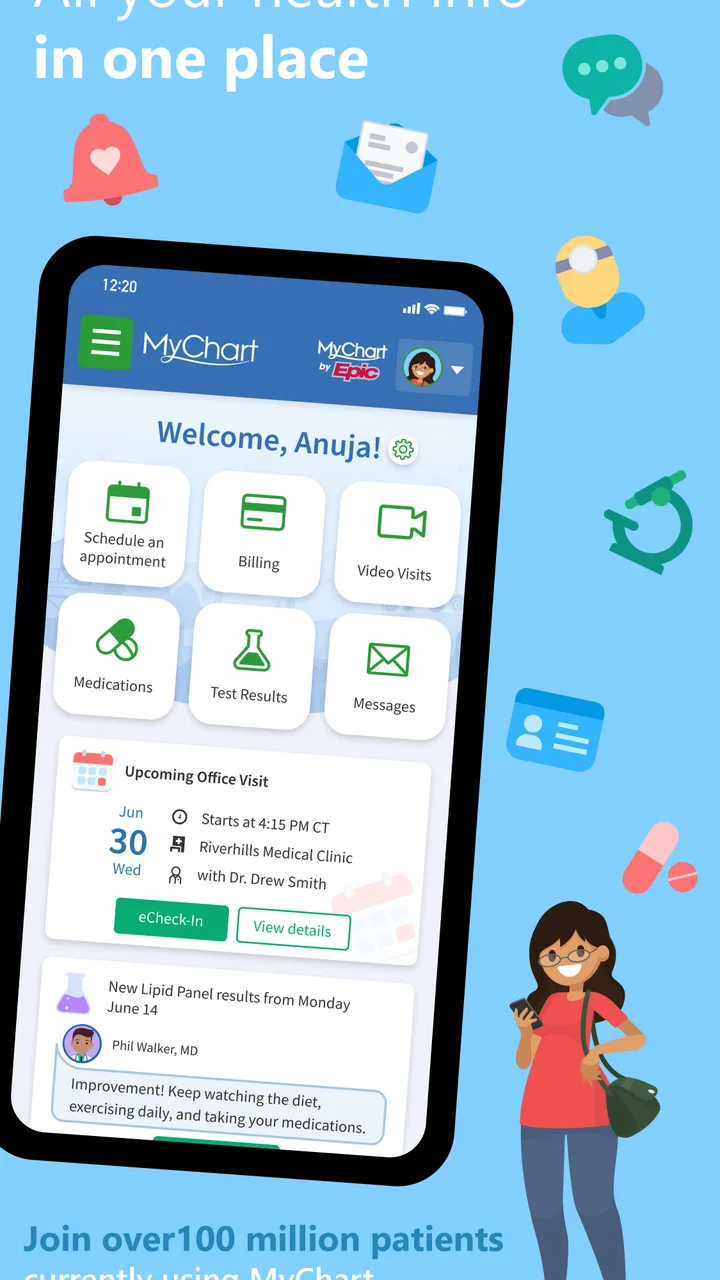
MyChart is a comprehensive health management app that provides users with access to their medical records, test results, and appointment schedules. It allows for seamless communication with healthcare providers, making it easier to manage health information and track health progress directly from a mobile device.
02Is MyChart available on both Android and iOS?
Yes, MyChart is available for both Android and iOS devices. Users can download the app from the Google Play Store or the Apple App Store, ensuring accessibility across different platforms. This flexibility allows users to access their health information anytime, anywhere.
03How secure is my personal health information on MyChart?
MyChart employs robust security measures to protect users' personal health information. It uses encryption and secure login processes to ensure that sensitive data remains confidential. Users are advised to create strong passwords and enable additional security features like two-factor authentication for added protection.
04Can I schedule and manage appointments through MyChart?
Yes, MyChart allows users to schedule, reschedule, or cancel appointments directly through the app. It also provides notifications and reminders for upcoming appointments, ensuring users stay informed and organized regarding their healthcare schedules.
05Does MyChart provide access to medical test results?
Absolutely, MyChart enables users to view their medical test results as soon as they are available. The app offers detailed explanations of the results, helping users understand their health conditions better. This feature enhances patient engagement and encourages proactive health management.
Pros
- User-friendly interface for easy navigation.
- Secure access to personal health information.
- Appointment scheduling is straightforward.
- View test results as soon as they're available.
- Supports multiple healthcare providers.
Cons
- Limited features depend on healthcare provider.
- Occasional login issues reported by users.
- Notifications can be overwhelming at times.
- No offline access to medical records.
- Some features require a stable internet connection.

MyChart
Gallery